
Comparing Online & Desktop Soundboards
Choosing the right tool for your audio setup can be the difference between a viral comedic moment and a technical disaster. As digital communication shifts toward more expressive, sound-driven interactions, many creators find themselves at a crossroads. Should you use a quick, browser-based tool, or invest time in professional software?
In this comprehensive guide, we are Comparing Online & Desktop Soundboards to help you identify the perfect fit for your workflow, whether you are a casual chatter or a professional broadcaster.
1. The Soundboard Dilemma: Why the Choice Matters
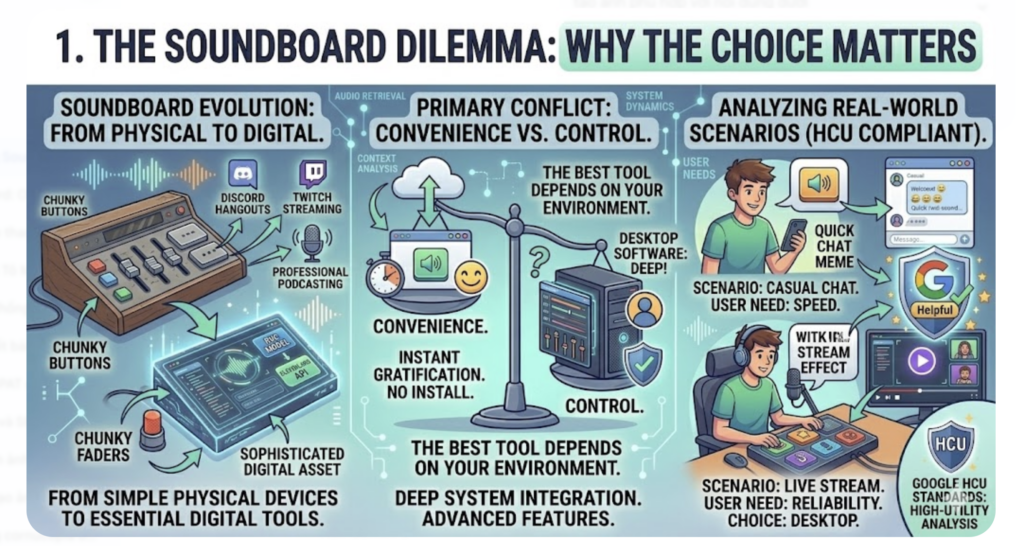
Soundboards have evolved from simple physical devices into sophisticated digital assets. Today, they are essential for Discord hangouts, Twitch streaming, and even professional podcasting. However, the “best” tool depends entirely on your specific environment.
When Comparing Online & Desktop Soundboards, the primary conflict is usually between Convenience and Control. An online tool offers instant gratification, while desktop software offers deep system integration. To satisfy Google’s Helpful Content Update (HCU) standards, we won’t just list features; we will analyze how these tools perform in real-world scenarios.
2. Online Soundboards: The King of Speed and Accessibility
Online soundboards are web-based platforms that allow you to play audio clips directly through your browser. They have surged in popularity because they remove the “barrier to entry.”
The Pros:
Zero Installation: You don’t need to worry about malware, disk space, or administrative privileges. This makes them ideal for work environments or public computers.
Universal Compatibility: Whether you are on a Chromebook, a MacBook, or a mobile device, a web-based soundboard works everywhere.
Discoverability: These sites often feature massive community libraries. If a meme goes viral at 2:00 PM, an online community has usually uploaded it by 2:05 PM.
The Cons:
Internet Dependency: If your Wi-Fi stutters, your sound bite will lag.
Audio Routing Issues: Since the audio plays in the browser, it can be tricky to “feed” that sound into an app like Zoom or Discord without using third-party drivers like VB-Audio Virtual Cable.
For those who need a quick reaction for a funny moment, the simplicity is unbeatable. For instance, if a conversation gets awkward and you need to signal a quick exit, jumping to a Get Out soundboard via your browser is much faster than opening a heavy software application.
3. Desktop Soundboard Software: Precision and Power
For power users, professional software (like Soundpad, Voicemod, or Elgato Stream Deck software) is the industry standard. These are installed locally on your operating system and offer a deeper level of hardware communication.
The Pros:
Near-Zero Latency: Because the files are stored on your SSD, the sound triggers the millisecond you hit the key. In the world of Comparing Online & Desktop Soundboards, desktop apps always win on speed.
Global Hotkeys: Unlike web tools, desktop apps can listen for keypresses even when they are minimized. You can trigger a “Victory” sound while in the middle of a high-stakes gaming match without ever alt-tabbing.
Advanced Audio Processing: Many desktop tools allow you to add live effects like reverb, pitch shifting, or noise gates to ensure the sound blends perfectly with your microphone.
The Cons:
Steep Learning Curve: Setting up virtual inputs and outputs can be daunting for beginners.
Cost: While many online tools are free, the best desktop software often requires a one-time purchase or a subscription.
4. Head-to-Head Comparison Table
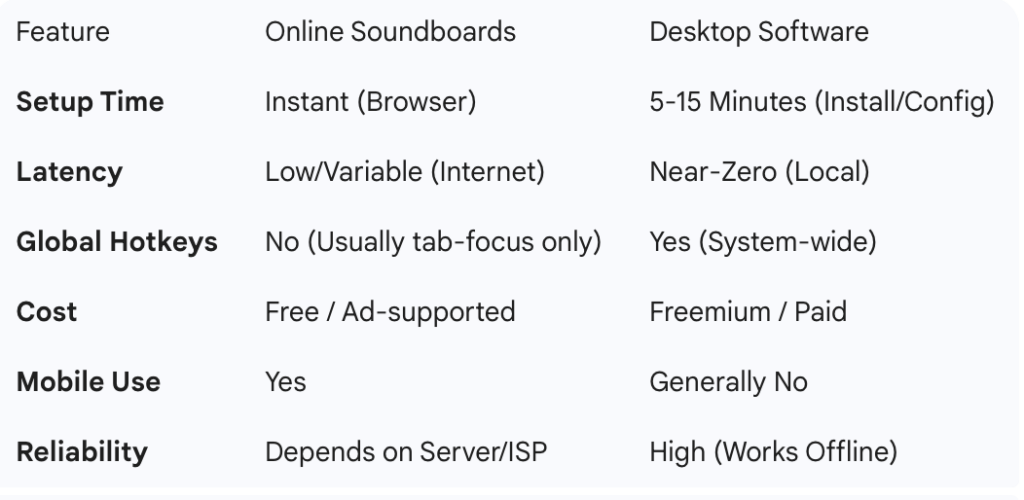
To provide high-utility value—a core requirement for HCU—here is a quick-reference guide:
5. Navigating the HCU Era: How to Choose?
Google’s Helpful Content Update rewards content that helps users make informed decisions. When Comparing Online & Desktop Soundboards, you should choose based on your “User Intent”:
Choose an Online Soundboard IF:
You are a casual user who wants to share memes in group chats.
You use multiple devices and don’t want to sync files manually.
You need to find a specific trending sound (like a classic movie quote) quickly.
Choose Desktop Software IF:
You are a streamer or content creator where timing is everything.
You need the sound to play through your “Microphone” input in games.
You want to use dedicated hardware like a MIDI controller or a Macro pad.
6. The Future of Soundboards: The Hybrid Model
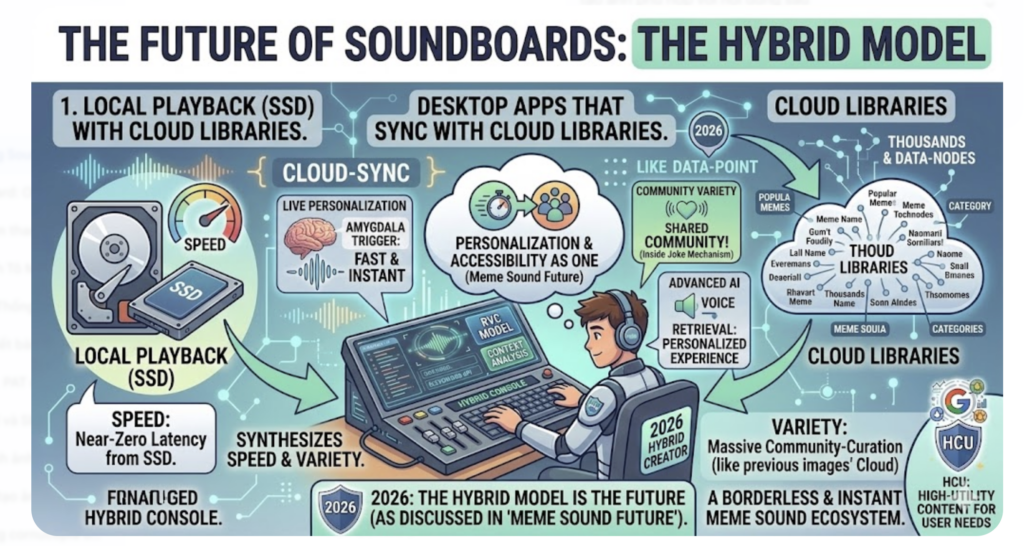
As we move further into 2026, the gap is closing. We are seeing the rise of “Hybrid” soundboards—desktop applications that sync with cloud libraries. This allows for the speed of local playback with the massive variety of online communities. This evolution mirrors what we discussed in the Meme Sound Future: How AI Voice Changes It, where personalization and accessibility are becoming one and the same.
7. Conclusion: Context is Everything
Ultimately, Comparing Online & Desktop Soundboards reveals that neither is strictly “better.” If you are in a casual Discord call and want to drop a Get Out soundboard clip to tease a friend, the online version is your best friend. But if you are performing a live comedy set or streaming to thousands on Twitch, the reliability of desktop software is worth the investment.
The key to a great audio experience is knowing your tools. Start with an online platform to see which sounds resonate with your audience, and then graduate to a desktop setup once you are ready to take your production value to the next level.