
Build a Personal Soundboard with Node.js
Are you a streamer, podcaster, or just want to “troll” your friends during Discord calls? A Soundboard allows you to trigger iconic meme clips like “Bruh,” “Emotional Damage,” or “Ting Ting” with just a single click. Instead of using paid software or apps filled with annoying ads, you can learn how to build a personal soundboard with Node.js to create a fully customizable, lightweight tool.
1. Why Choose Node.js for a Soundboard?
Node.js isn’t just for web development; it’s incredibly flexible when interacting with your computer’s audio system through open-source libraries. When you decide to build a personal soundboard with Node.js, you gain:
Complete Control: Add or remove sounds and customize hotkeys exactly how you want.
Deep Integration: Connect directly to audio APIs or professional software like OBS.
Skill Building: Improve your knowledge of event-driven programming and stream handling.
2. Prerequisites
Before we dive in, make sure your computer has the following installed:
Node.js (LTS version recommended). Download it from the official Node.js website.
A code editor (VS Code is the top choice).
An audio library: We will use play-sound to trigger audio files directly from the Server.
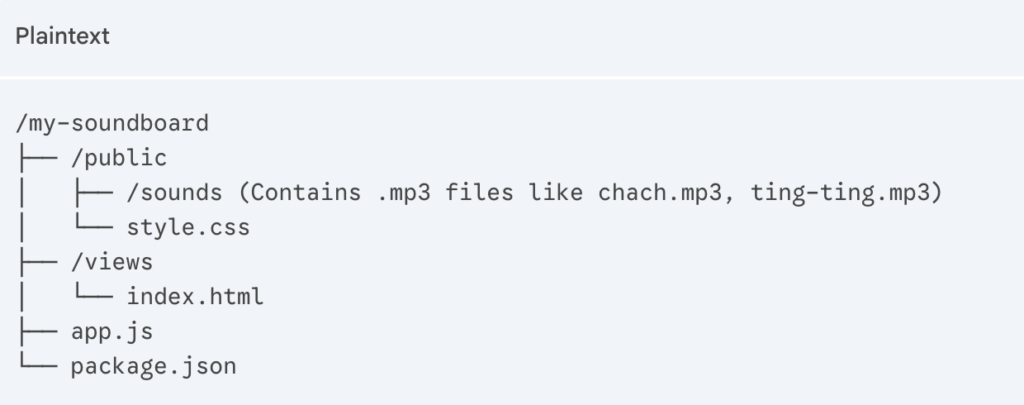
3. Project Structure
Organize your project folder logically to make managing your meme library easier:
4. Building the Soundboard: Step-by-Step
Step 1: Initialize the Project
Open your terminal and run:

Note: Using Express.js simplifies the creation of the API routes we need for our soundboard.
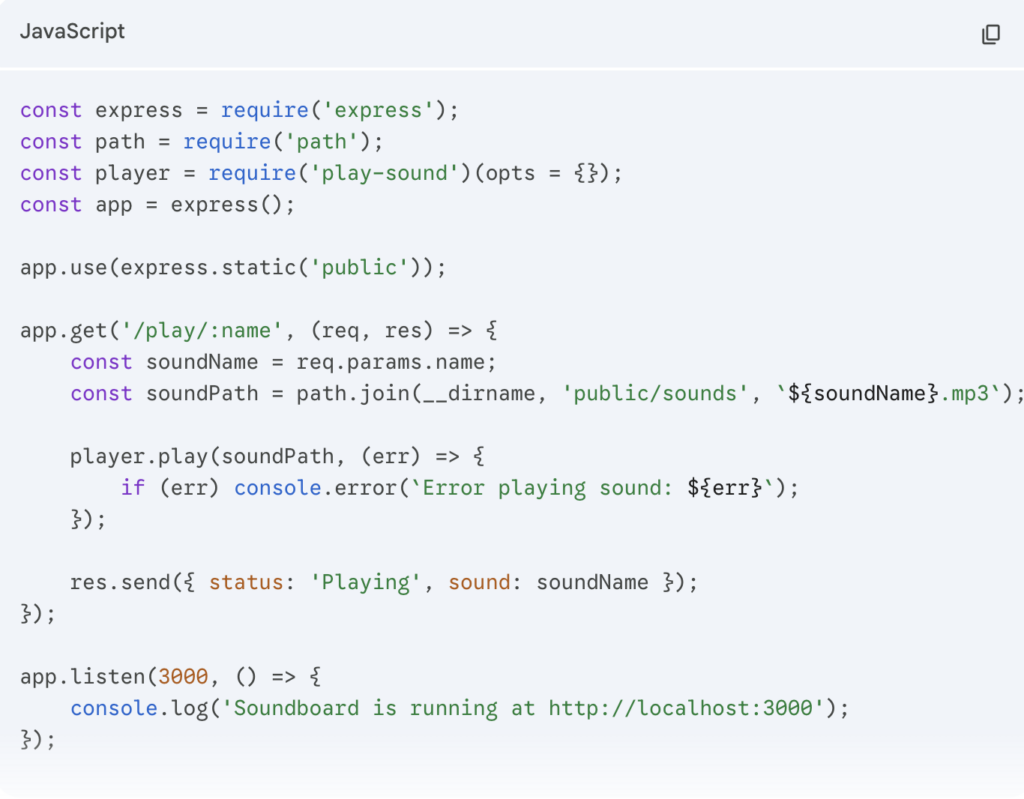
Step 2: Build the Backend (app.js)
This is the “brain” of your app. It receives requests and commands your computer to play the audio.
5. Deep Dive: Handling Concurrent Audio and Overlaps
One of the most important aspects when you build a personal soundboard with Node.js is managing how sounds overlap. In a chaotic gaming session, you might want to spam the “Metal Pipe” sound or trigger multiple effects at once.
Using the play-sound library allows for asynchronous execution, meaning your Node.js server doesn’t “freeze” while a 5-second audio clip is playing. To take this further, you can implement a Kill Switch API. This is essential for stopping long, accidental audio clips (like a 2-minute song) without restarting the entire server. By storing the process returned by player.play(), you can call .kill() to stop the audio instantly, giving you professional-level control over your soundboard’s output.
6. Pro Tips: Reducing Latency and Optimizing Experience
File Format: Use .mp3 files at 128kbps or .wav files to reduce CPU decoding time for instant playback.
Resource Library: Update your collection with the latest hits from the Top 50+ TikTok Meme Sounds Taking Over 2026 to keep your content fresh.
Hotkeys: Integrate libraries like iohook so you can trigger sounds via physical keys (like F1) without switching tabs.
7. Routing Audio to Discord or OBS
To let others hear your soundboard, you need a Virtual Audio Cable.
Install VB-CABLE Virtual Audio Device.
Set the Output of your Node.js application to “CABLE Input.”
In Discord or OBS, select the Input (Mic) as “CABLE Output.”
All sounds from your Soundboard will now stream directly into the conversation.
Conclusion: Beyond Just a Simple Tool
Learning how to build a personal soundboard with Node.js is more than just a fun coding exercise; it’s a gateway into the world of real-time media processing and creative engineering. In an era where digital presence is everything, having a tool that you fully control allows you to stand out as a creator. You are no longer limited by the features of third-party apps—you now have the foundation to build anything from a simple meme-triggering board to a complex, automated broadcast system.
The journey doesn’t have to stop here. Once you’ve mastered the basics, consider adding a web-based dashboard that you can access from your smartphone, turning your mobile device into a remote control for your PC’s audio. Or, explore integrating Voice Recognition APIs to trigger sounds using only your voice commands. By choosing to build a personal soundboard with Node.js, you’ve gained a versatile skill set that bridges the gap between software development and digital entertainment.
So, go ahead and experiment. Combine the technical power of Node.js with the massive library of sounds available at Instants.Meme, such as the Evolution Mega Knight Soundboard, to create an audio experience that is uniquely yours. The only limit is your imagination.
What feature are you planning to add next to your soundboard? Whether it’s a sleek dark-mode UI or global hotkeys, share your ideas in the comments below, and let’s build the future of content creation together!